Exploding box, 8 s
39 creditsA coffee sampler box: everything rises out and packs back in
Use with my filesEvery picture on this page is a real 3D render. Pick one, or describe a shot of your own in plain words. Upload your artwork, print files or mockups, and we make it with your product.
FreeYour first animation is free
Up to 5 objects and 10 seconds, with a 4K still. After that, animations are 29–39 credits depending on the shot, and stills are 19.
Your art goes onto the model exactly as you send it. We never redraw, retouch or generate it. How it works
A coffee sampler box: everything rises out and packs back in
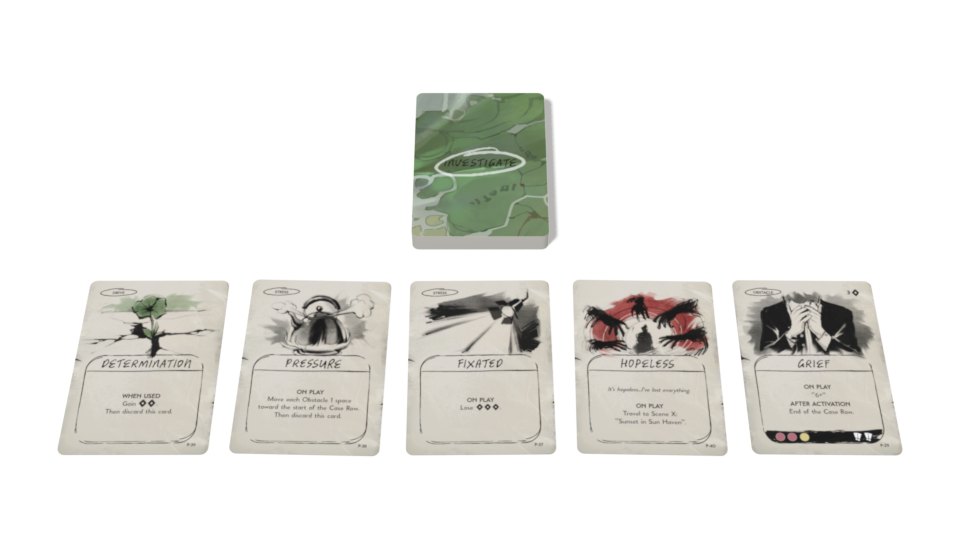
Use with my filesA tarot deck fans out and deals
Use with my filesA skincare gift box opens on its cream, serum and tube
Use with my filesA hardcover novel opens and its pages turn
Use with my filesFour flavours of sparkling water drop into line
Use with my filesA seltzer can wrapped in the Great Wave turns
Use with my filesA rose night cream in Van Gogh's Roses
Use with my filesThe 1938 poster reprint, framed on a wall
Use with my filesThree coffees and their drip bags, from above
Use with my filesWant something none of the shots above do? Say what should happen, in your own words, and we build the scene around your product. Each of these was made from the words under it.
“The cereal box opens at the top, tips over, and cereal pours out into a bowl.”Start from this description
“Our neoprene playmat starts rolled up, then unrolls across the table.”Start from this description
“I want you to create a scene where all of the components start in the box and then everything expands, a bit like the Apple disassembly thing, cool camera angles with rotating, and then everything going back into the box in a satisfying way.”Start from this description
Each shot's price includes a preview, 2 adjustments, the final in every format you pick and 1 revision.
Full pricingNot one picture but the whole set: every size, from the angle you want, with the same product in every shot.
Add a picture or a short video you like. We match its camera, light and motion, with your product in it.
4K stills, plus wide, square and 9:16 video for Reels and TikTok, GIFs and transparent video. Need another size later? Add it free.
Step through your animation and pull out the moment you like, in every still size.
Choose the camera angle in your browser before anything renders, then move pieces and cameras on the preview with Fix it in 3D. No 3D skills needed.
Your products and scenes stay in your library, so every shot of a launch shows the same product, lit the same way.
Editors share your credits; reviewers look, comment and approve without spending any. Keep a workspace for each client or brand.
Click on the frame and type what you want, like commenting on a doc: slower here, a softer shadow. You get a new version and can compare the two side by side.
You, at 0:02.4
Slow the last card down so it lands gently.
Image generators redraw your product and get the text wrong. We map your actual artwork onto an accurate 3D model, so every letter stays sharp and every shot matches.
| Compared on | Setpiece | Image generators | Freelance 3D artist | Learn Blender |
|---|---|---|---|---|
| Uses your exact artwork | Yes | No | Yes | Yes |
| Text and art stay pixel-accurate | Yes | No | Yes | Yes |
| Same product in every shot | Yes | No | Yes | Yes |
| Real animation, transparent video | Yes | No | Yes | Yes |
| No 3D skills needed | Yes | Yes | Yes | No |
| Cost per shot | From $29 an animation with its 4K still, $19 a still | Cents, on a subscription | Often $100 or more | Free software, plus your time |
| Turnaround | Minutes to an hour | Seconds | Usually days | Weeks to learn, then hours a shot |
PDF, Illustrator (PDF-compatible), PNG, JPG, WebP, TIFF, SVG, Photoshop or a ZIP of them, or a 3D model (STL, OBJ, GLB or Blender .blend; a STEP file exported as one of those), up to 200 MB a file. Print files give the sharpest result: we read the real size from the PDF trim box or the image's DPI. A flat image of each side, or a mockup, works too: if a file doesn't say its size, you can set it when you check the product in 3D.
Anything printed, folded, bound or boxed. Drink cans (standard, sleek, slim and tallboys), bottles (wine, spirits, beer, droppers, supplements, lotion), candle jars and tins, cosmetic and food jars, squeeze tubes, stand-up pouches and sachets, 11 oz and 15 oz mugs, boxes and cartons, books, card decks, posters, game boards and pieces, plus 3D models from STL or Blender files. Each comes in standard sizes with a template to draw your art on.
No. We build it in 3D from your print files at their real size, so you can make launch, pre-order and crowdfunding visuals before anything is manufactured. The files you'd send your printer are all we need.
No. Your artwork is never redrawn, retouched, upscaled or generated: your own files are printed onto true-to-size 3D models, and the shot is rendered in Blender. AI helps with two jobs a 3D artist's assistant would do: reading your files (which object is which, and where its art goes) and setting up the scene (camera, light and motion) from your brief. Your files are never used to train AI models.
Yes. We don't redraw your product with an image model. Your actual files are mapped onto accurate 3D geometry, so type stays crisp and colours match your files. If text or art comes out wrong, we redo it free, up to twice per render.
Credits are used when a render starts. For new files, a bigger scene's extra is asked at the 3D check, before we build the shot. The price covers a preview of the key moments (usually about five minutes once your objects are checked), 2 adjustments to it, the final render in every format you picked and a revision. Your first animation is free: up to 5 objects and 10 seconds.
Only these, each shown before you pay: animations over 10 seconds (1 credit a second, up to 20), a new object we build in 3D from your description and photos (19 credits, once; it then stays in your library), scenes of more than 5 objects (+1 credit for every 2 more), and uploads of more than 20 files (+5 credits, or +10 credits past 50; an upload holds up to 100). A deck or a sheet of tokens counts as one object, or as one per 10 pieces in shots that move pieces one by one.
Every render includes a revision. Each one after that is 1 credit per 10 objects in the scene, at least 1 credit for a still and 2 credits for an animation. If a render fails on our side, your credits come back automatically.
Yes. Stores, ads, crowdfunding pages, decks, print: they're yours, with no watermark.
Your files are only used to make your renders, never to train AI models. Each job runs in its own wiped workspace under its own user, and nothing is kept on the GPU servers after a job.
1 credit = $1, and every price is a whole number of credits: an animation is 29 to 39, depending on the shot, with its 4K still, and a still on its own 19. Credits come with a monthly plan: Starter, $50 for 50; Launch, $150 for 165; Studio, $400 for 480. Unused credits roll over every month while you're subscribed, with no cap. If you cancel, they last until the paid month ends, then they're removed. Top-ups never expire.
Any time, on the Credits page. Moving up charges the difference now and adds the difference in credits now; moving down starts at your next charge. Pause for up to 3 months and nothing is charged, with your credits kept. On Studio, top up 120 credits for $100 whenever you need more.
Try it on your own artwork: upload your files, check them in 3D, and see a preview minutes later. Up to 5 objects and 10 seconds, with a 4K still.
Start a renderQuestions before you start? A person reads every message and answers within one working day.
Write to us

